

How to Choose Rackmount PCs in 2026?

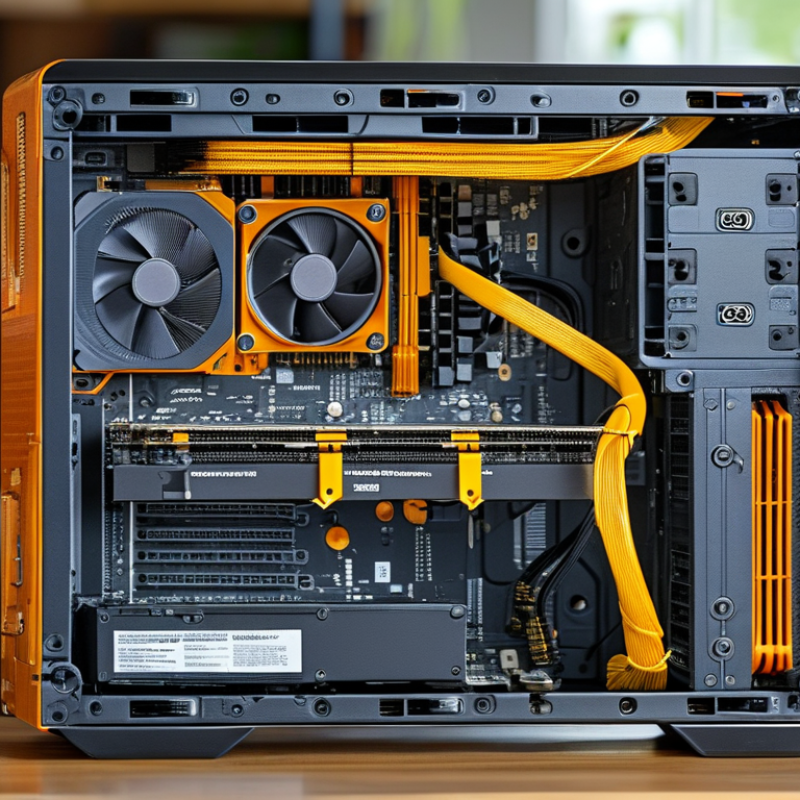
Choosing Rackmount Pcs in 2026 requires more than comparing processor names and price tags. A powerful system may still fail inside a crowded, noisy rack. The right choice must match workload, chassis depth, airflow, expansion needs, and service expectations. This guide explores those decisions through practical deployment details and current hardware considerations. Picture a 2U system with hot-swappable drives, dual power supplies, and warm exhaust leaving the rear panel. In a compact data room, those details influence uptime, cooling costs, and technician safety. They are not decorative specifications.

Reliable selection also depends on evidence. Reviewers should examine independent benchmarks, manufacturer documentation, warranty terms, firmware support, and replacement-part availability. A virtualization host needs different priorities than a video-processing node or industrial controller. CPU performance matters, but memory channels, PCIe lanes, storage endurance, and remote management can matter more. Noise levels deserve attention, especially in offices or edge locations. Small oversights become expensive later. No checklist is perfect. Real installations often reveal compromises that product pages hide. A well-supported vendor, tested configuration, and clear upgrade path can reduce those surprises. Still, “future-proof” is an imperfect promise; budgets, software requirements, and rack standards may change sooner than expected. The following sections provide a practical framework for evaluating Rackmount Pcs with technical discipline, field awareness, and realistic expectations.
How to Choose Rackmount PCs in 2026?

Define Rackmount PC Needs: 1U Equals 44.45 mm in a 19-Inch Rack

Choosing a rackmount PC in 2026 starts with physical fit, not processor speed. In a standard 19-inch rack, 1U equals 44.45 mm of vertical space. A 2U chassis needs 88.9 mm, before allowing for mounting hardware. This measurement sounds simple. It is easy to misread. Check the rack’s usable height, rail range, and front-to-rear depth. A short cabinet may accept the width but reject the chassis depth.

Define the workload before selecting a configuration. Video processing, industrial control, virtualization, and edge analytics need different cooling and expansion choices. I once focused on CPU performance and overlooked rear cable clearance. The system fit the rack, but service access became awkward. Leave room for airflow, power connectors, network cables, and sliding rails. Confirm supported memory, storage temperature ratings, and continuous-duty limits. Reliable planning uses mechanical drawings and independent measurements. Do not assume every 1U computer offers the same internal space.

Tips: Measure the rack opening with a steel ruler. Record height in U and millimeters. Verify 19-inch compatibility, rail depth, and cable bend radius. Prefer front-to-back airflow when nearby equipment follows the same pattern. Review noise limits in occupied rooms. Test one assembled unit before ordering many. That extra check may feel slow. It often prevents an expensive redesign. I still leave more clearance than my first plan suggests.

Match CPU, GPU, and RAM: Compare TDP, DDR5, and PCIe 5.0 at 32 GT/s

Choosing a rackmount PC in 2026 starts with workload, not socket count. Match CPU, GPU, and RAM against sustained power, airflow, and expansion limits. A 250-watt CPU can demand more cooling headroom than its label suggests. TDP is a design reference, not a guaranteed wall-power reading. Use measured package power, GPU board power, and chassis inlet temperature during validation. The IEA’s Electricity 2024 report estimates data-center electricity demand could exceed 1,000 TWh in 2026. Power efficiency is no longer decorative. It matters.

PCIe 5.0 carries 32 GT/s per lane, according to PCI-SIG specifications. A x16 link offers roughly 64 GB/s in one direction after encoding overhead. That bandwidth suits high-throughput accelerators, fast storage, and multi-device transfers. Yet a GPU may remain compute-bound. Do not pay for lanes you cannot feed. Check CPU lane allocation, bifurcation, slot spacing, and riser signal quality. A real-world rack test should copy datasets while fans run steadily. Small detail.

For memory, DDR5 improves bandwidth and density, but capacity usually matters first. JEDEC’s DDR5 standard defines higher transfer rates and stronger on-die reliability features than earlier generations. Choose enough RAM to avoid paging, then verify channel population and error-correction support. A practical starting point is balanced channels, not the maximum DIMM count. Specifications can look impressive while airflow quietly throttles performance. That mistake is costly. Leave thermal and power margin, even when benchmark results look perfect.

How to Choose Rackmount PCs in 2026? - Match CPU, GPU, and RAM: Compare TDP, DDR5, and PCIe 5.0 at 32 GT/s

A practical comparison of rackmount configurations for compute, visualization, storage, and accelerated workloads.

Rackmount profile Recommended CPU class CPU TDP target DDR5 memory configuration GPU and accelerator fit PCIe 5.0 requirement Estimated system power planning Best use cases
1U compact compute 8–16 core server or workstation CPU with strong efficiency 65–125 W 64–256 GB DDR5; ECC UDIMM or soldered ECC only where supported; prioritize lower-height modules Integrated graphics, low-profile accelerator, or short single-slot card up to approximately 75–150 W One PCIe 5.0 x16 slot is useful for networking, storage, or a compact accelerator; verify riser clearance 450–800 W power supply capacity, depending on drives and expansion cards Web services, edge computing, virtualization, monitoring, and dense storage control
2U balanced workstation 16–32 core CPU with high sustained multi-thread performance 125–250 W 128–512 GB DDR5 ECC RDIMM; use matched channels and populate memory evenly One professional or compute GPU in the 150–300 W range, subject to airflow and auxiliary power connectors PCIe 5.0 x16 for a GPU; additional x4 or x8 links for NVMe storage or high-speed networking 800–1,200 W power supply capacity with sufficient 12 V headroom CAD, simulation, media processing, databases, virtualization, and software development
3U accelerated compute 24–64 core CPU, selected for memory bandwidth and sustained all-core workloads 200–350 W 256 GB–1 TB DDR5 ECC RDIMM; consider multiple memory channels and registered modules One or two accelerators at approximately 250–450 W each if the chassis supports full-height airflow and power cabling At least one PCIe 5.0 x16 link per accelerator; check slot bifurcation, lane routing, and physical spacing 1,200–2,000 W capacity; redundant supplies are recommended for continuous workloads AI inference, scientific computing, rendering, video analytics, and engineering simulation
4U expansion platform 32–96 core CPU or dual-socket platform where memory capacity and I/O density dominate 250–500 W total CPU envelope, depending on socket count and cooling design 512 GB–2 TB DDR5 ECC RDIMM or 3DS RDIMM; validate maximum supported capacity and rank population Two to four accelerators, high-speed storage adapters, or specialized PCIe cards when slot spacing permits Multiple PCIe 5.0 x16 slots are preferred; confirm CPU-to-slot topology and available lane count 1,600–3,000 W capacity; use thermal and electrical limits rather than GPU count alone Large-scale virtualization, GPU compute, digital content creation, research, and high-density data processing

Key specification reference

Specification Practical value Selection guidance
CPU TDP A thermal design reference, not a guaranteed maximum wall-plug power figure Leave cooling and power margin for sustained turbo operation, memory, drives, fans, and expansion cards.
DDR5 data rate Common JEDEC baseline speeds include 4,800, 5,600, and 6,400 MT/s; actual speed depends on the CPU and memory population For servers, prioritize ECC support, capacity, channel balance, and validated module configurations over peak rated speed.
PCIe 5.0 32 GT/s per lane; approximately 3.94 GB/s of usable one-way bandwidth per lane after 128b/130b encoding A full x16 link provides approximately 63 GB/s one-way bandwidth. Confirm that the slot, riser, device, and CPU lane support all match.
GPU power Accelerator boards commonly range from approximately 75 W to 450 W or more Check auxiliary connectors, slot power limits, chassis airflow, card length, card height, and spacing between adjacent cards.
Rack airflow Front-to-back airflow is the normal design target for data-center rack equipment Choose a chassis with adequate fan capacity and test inlet temperature, especially in dense 1U and 2U installations.
Planning note: TDP, memory speed, and PCIe link rate describe different limits. Final compatibility depends on the motherboard, firmware, socket platform, riser layout, power supply, cooling system, and operating environment.

Size Cooling and Power: Follow ASHRAE’s Recommended 18–27°C Inlet Range

How to Choose Rackmount PCs in 2026?

Rackmount PCs should be selected around inlet temperature, not only processor speed. ASHRAE TC 9.9 recommends an 18–27°C inlet range for air-cooled information technology equipment. This range supports dependable operation while limiting unnecessary cooling demand. Measure temperature at the rack’s front, where equipment receives air. A room thermostat can hide dangerous hot spots.

The Uptime Institute’s 2024 Global Data Center Survey continues to identify power and cooling efficiency as major operational concerns. A high-performance rack PC may draw substantial power under continuous workloads. That electricity becomes heat. Check the system’s sustained thermal design power, airflow direction, and fan control before purchase. Leave space for cable routing and service access. A crowded rack often performs worse than expected. I have seen intake temperatures rise several degrees after adding only a few poorly placed devices. That small mistake is easy to miss.

Tips: Keep rack inlets between 18 and 27°C. Log temperatures during peak workloads, not just idle periods. Use blanking panels and separate hot and cold air paths. Consider redundant fans and power supplies for critical systems. Do not size cooling from average power alone. Peak loads matter. ASHRAE also publishes broader allowable ranges, but treating those limits as everyday targets can reduce reliability. In practice, clean filters, uneven airflow, and seasonal humidity complicate the neat specification sheet. Check the installation twice.

Evaluate Reliability: Check MTBF, ECC Memory, RAID, and Redundant Power

How to Choose Rackmount PCs in 2026?

Reliability begins with evidence, not impressive specifications. Check the MTBF rating, but treat it as a statistical estimate under defined conditions. It is not a guaranteed service life. Ask whether the rating covers the complete system or only selected components. In rack deployments, I have seen a high MTBF figure fail to predict problems caused by heat, dust, and blocked airflow. Measure the actual inlet temperature during peak workloads.

ECC memory is essential for systems handling databases, industrial records, or long-running calculations. It can correct many single-bit errors before they become software failures. However, ECC does not prevent every memory problem. Use operating system logs and hardware monitoring to track corrected errors. A rising count deserves investigation.

RAID protects availability, but it is not a backup. RAID 1 can keep a system running after one drive fails, while RAID 10 often suits heavier workloads. Confirm rebuild times before deployment. A rebuild can expose a second weak drive. Redundant power supplies reduce one failure point, especially when connected to separate circuits. Test failover during maintenance, not during an emergency. Keep spare drives and power modules nearby. I once underestimated cable strain around a replacement power unit. The repair worked, but airflow suffered. Reliability checks need this kind of practical review.

Plan Deployment: Verify Rack Depth, Remote Management, and 2026 OS Support

How to Choose Rackmount PCs in 2026?

Begin with the rack, not the processor. Measure usable depth from the front rails to the rear cable bend. A chassis may fit physically but block power connectors or airflow. The EIA-310 standard defines rack-unit width and mounting dimensions, not your cabinet’s real clearance. Measure twice. Leave room for sliding service access, cable strain, and rear ventilation.

Remote management should be treated as an operational requirement. Select systems supporting independent hardware monitoring, remote console access, event logging, and secure firmware updates. NIST SP 800-53 Revision 5 recommends strong access control, audit records, and protected maintenance channels. Use separate management networks where possible. Uptime Institute’s 2024 Global Data Center Survey reported that more than half of operators experienced an outage within three years. Remote diagnostics cannot prevent every failure, but they can reduce unnecessary site visits and recovery delays.

Check 2026 operating-system support before approving the configuration. Confirm the exact edition, driver availability, security-update dates, and downgrade rights. Ask whether remote-management software supports the planned OS release. Also verify firmware compatibility with virtualization and storage tools. Lifecycle tables change. Recheck them before shipment. I have seen deployment plans fail because the hardware passed testing, while one network driver lacked long-term support. That mistake is avoidable, though procurement schedules often encourage rushed decisions. A written compatibility matrix, reviewed by both IT and facilities teams, provides stronger evidence than a sales specification alone.

How to Choose Rackmount PCs in 2026? - Plan Deployment: Verify Rack Depth, Remote Management, and 2026 OS Support

Use standardized rack-unit dimensions as the starting point for chassis planning. A rack unit is defined as 44.45 mm, while usable rack depth varies by enclosure, cable clearance, power distribution, and airflow design.

Verify Rack Depth

Measure the usable rail-to-door distance, not only the nominal cabinet depth. Include rear cables, airflow space, and power connectors.

Confirm Remote Management

Check for out-of-band access, remote console, power control, firmware updates, and compatibility with your management workflow.

Plan 2026 OS Support

Select an operating-system release with security maintenance that extends beyond the intended service life and validate driver support before deployment.

Rack-unit heights are based on the standard definition of 1U = 44.45 mm. Actual chassis height, depth, rail requirements, and clearance must be verified with the equipment documentation.

Powder Coat Booths

For those larger-sized parts, or smaller quantity runs, we have 2 independent powder coat booths and ovens. The quality, durability and affordability of today’s powder coating finishes make this the process of choice for world-class companies.

Powder coating advantages over other forms of coating are many. Materials used in the Powder coating process can be metals and non-metals that come in a multitude of thicknesses, textures, colors, etc. Another of Powder coating’s biggest advantages over conventional coatings is its ability to create finishes in many different textures. Powder Coating Booths allow us the ability to apply these advantages to large products.

Wet Paint Line

Tri-State Fabricators runs a full-service conveyor line for painting. Wet painting can provide protection or decoration to many different part styles. From start to finish, every project is easier to undergo random and point-based inspection by our skilled painting team.

Advantages to our Wet Paint Line are these lines start with product prep and ends with a thorough inspection of a high quality finished product. Our ability to complete large and small projects with a superior finish and doing so in a timely and economical fashion. This passes along the savings in production to our customers. When powder coating ins not an option, our Wet Paint Line gets the job done right the first time.

Wet Paint Booths

When the parts get big and heavy we roll-out our custom paint racks and oversize booth. By utilizing our partnerships with all the major paint brands, we can match virtually any color with wet paint.

The advantages of having access to a Wet Paint Booth are many. Large projects of many different shapes can be loaded into the booth. The Wet Paint Booth offers an environment that is much more controlled than a typical parts painting operation.

Not only are they used because of their controlled environment, but they’re are also advantageous when it comes to applying paint to parts that are needed in industries that require specialty coatings such as medical, aerospace, etc.

Military CARC

Our military forces have some very high standards when it comes to the finish of their vehicles and equipment. From the first pre-treatment step to final coat, it takes a great deal of knowledge and experience to protect the men and women of our armed forces. They deserve only the best, and Tri-State Fabricators provides it.

All of our processes are closely monitored by our staff and management teams. Both of which are highly trained in the processes of metal fabrication and finishing. Tri-State Fabricators’ goal is to always fully satisfy each and every customer, including the military. We will always put a 110% into what we do.

Glass-Bead Blasting

Abrasive media blasting is an excellent way to remove old paint, rust, and increase the paint/powder adhesion. Glass beads produce a much smoother and brighter finish than angular abrasives; leaving the part clean yet without any dimensional change. Chemically inert and environmentally friendly, we can recycle our beads approximately 30 times; making them a more preferred method of metal cleaning or surface finishing.

Advantages to Glass Bead Blasting are many. Glass bead blast media is used when a project is needing rough surfaces need to become smooth for applications of coatings such as paint. It is typically used to clean paint and rust from a product surface without deforming the surface it is being used on. Overall, compared to many other blasting media, Glass Bead Blasting is a very economical choice and those savings are always passed on to our customers.

Part Washing

Tri-State Fabricators utilize a zinc phosphate wash to clean and etch the material to ensure the best paint adhesion possible. The unique design of our 3-stage wash system does the work like a 5-stage. From Cleaning and rinsing to conversion coating and post-treatment, Our Part Washing process is a complete service and works throughout the fabrication service and the finishing service.

Along with the previously mentioned benefits, Curing is a vital chemical reaction that leaves the product finish hard and relatively safe from mild abrasion and aggressive corrosion. This process can be done in more than one way; ambient air-dry or in curing ovens at temps that exceed 240°.

Burn-Off Oven

From fixing paint mistakes (someone else’s of course) to simply cleaning our paint line hooks, our burn-off oven is put to good use. After a quick burn-off, a little clean up, and a fresh coat of paint, your parts will look better than new.

Why does our Burn-Off Oven work so well? Because super heating the air around parts turns the materials into ashes. From paint and powder coatings to rubber and machining oils, high temps do the job without degrading the integrity of the part.

Masking

Masking is a vital part of producing high quality products. We have die-cut masking patterns to protect machined surfaces as well as a wide range of plugs and caps to protect threaded holes and bolts. We provide permanent and temporary masking.

Masking allows the selected sections of a product to be protected from a fabrication or finishing service. This can be with both chemicals when etching and tapes, paints when only finishing just a section of the product. Masking is great in aiding the customization process of a project.

Screen Printing

Screen printing is a photographic process that transfers artwork onto a porous nylon screen which allows colored ink to flow through the screen and be deposited on an aluminum or plastic component. We can generally have just about any design created onto a screen for your parts.

Some of the advantages of Screen Printing are, brand recognition for your business displaying on your products, assembly instructions, product warnings/hazards, etc. Tri-State Fabricators produces Screen Printing of the highest quality so you know it’s durable.

Metal Finishing

Metal Finishing is the art of treating the exterior portion of product, often metal but can also be made of other materials, so that the surface is clean and free of any debris. Then the process of applying coats or either paint of powder coat takes place. This coating process improves the quality of the product in both appearance and resistance to wear and corrosion.

Tri-State Fabricators, Inc., understands that a project typically isn’t complete until a high-quality finish has been added to your product. This is why our painting and powder coating teams continuously inspect the products throughout the Metal Finishing process.